 FrontDoor CDN Demo
FrontDoor CDN Demo
FrontDoor CDN Demo
A static-asset-rich Node.js app for end-to-end testing of caching rules, TTLs, and cache purging via Azure Front Door.
Both panels call API endpoints on the origin. The live panel uses
Cache-Control: no-store; the cached panel uses
s-maxage=60. Watch the timestamps — a frozen timestamp in the
cached panel confirms CDN is serving from cache.
These images are served with Cache-Control: public, s-maxage=86400.
After a purge the CDN must re-fetch them from the origin. Swap an image on the
server, purge the CDN path, then reload — the new image appears immediately.

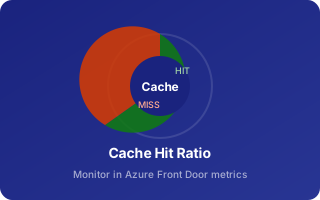

Open DevTools → Network tab and inspect these headers on any request routed through Azure Front Door.
| Header | Example Value | Meaning |
|---|---|---|
X-Cache |
HIT / MISS | Whether the CDN served from cache or fetched from origin |
X-Azure-Ref |
0a1B2c… |
Unique Azure Front Door request reference (use for diagnostics) |
Via |
1.1 Azure |
Confirms request passed through Front Door |
Age |
42 |
Seconds the object has been in CDN cache |
Cache-Control |
public, s-maxage=3600 |
Directives that Front Door honours when deciding to cache |
X-App-Version |
1.0.0 |
Custom header set by this origin — change to confirm purge worked |
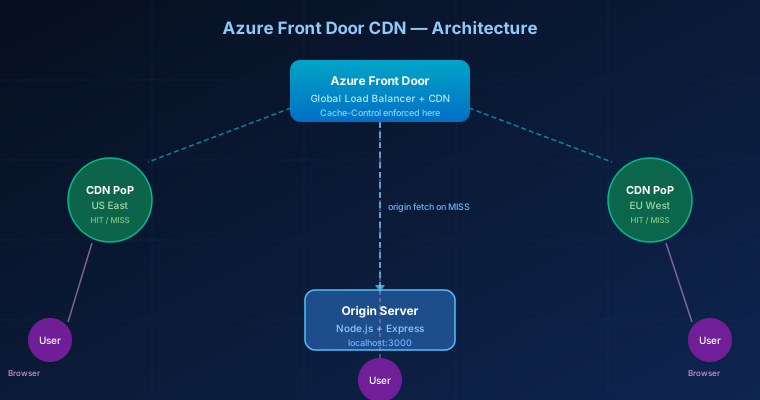
Architecture, TTL configuration, the end-to-end testing workflow, and tips.
The demo consists of a single Node.js + Express origin serving
static files from /public and four JSON API endpoints.
Azure Front Door sits in front and applies caching rules based on the
Cache-Control headers the origin emits.
Set in server.mjs via the CACHE_TTL constant.
| Resource type | Path pattern | Cache-Control sent | Purpose |
|---|---|---|---|
| HTML pages | *.html |
s-maxage=300 (5 min) |
Short TTL so page edits propagate quickly |
| CSS / JS | *.css, *.js |
s-maxage=3600 (1 hr) |
Medium TTL — good target for purge-on-deploy test |
| Images | *.svg, *.png, … |
s-maxage=86400 (1 day) |
Long TTL — purge is the only fast invalidation path |
| JSON data | /data/*.json |
s-maxage=60 (1 min) |
Short-lived data file |
| Live API | /api/info, /api/headers |
no-store |
Always fetched from origin — baseline for comparison |
| Cached API | /api/cached |
s-maxage=60 |
Demonstrates timestamp freeze when CDN caches JSON |
Open the Cache Test page and click Poll Cached Endpoint.
After the first request (MISS) click again — the timestamp should freeze,
confirming a CDN HIT. Check X-Cache: HIT in DevTools.
Bump the version in package.json to
2.0.0 and restart the server. The origin now returns
X-App-Version: 2.0.0, but CDN may still serve the old cached
copy with 1.0.0 until TTL expires or a purge is issued.
Reload static pages through the Front Door URL. Notice the old version badge
is still shown — the CDN is serving the stale cached HTML/JS/CSS.
Compare the X-App-Version header value to what the origin
returns via /api/version (which is no-store and
also reports the current process start time).
In the Azure Portal → Front Door → Purge cache, enter the paths
to purge (e.g. /* for all, or specific paths like
/index.html, /js/app.js, /images/banner.svg).
You can also use the Azure CLI:
az afd endpoint purge \
  --resource-group <rg> \
  --profile-name <profile> \
  --endpoint-name <endpoint> \
  --domains <your-frontdoor-host> \
  --content-paths "/*"
Reload pages through Front Door. The new version badge (2.0.0)
should appear, the images should update, and X-Cache should
show MISS on the first request post-purge before becoming
HIT again on subsequent requests.
Age response header tells you how long (in seconds) an object has been sitting in the CDN cache.s-maxage over max-age when both are present.Set-Cookie, Authorization, or no-store./api/headers to inspect which Azure headers Front Door is injecting into origin requests.